Shopify Collections: The Complete Guide

Shopify Collections: The Complete Guide
If you sell more than a handful of SKUs, your collection structure is doing more SEO and merchandising work than any single blog post you'll ever publish. Get it wrong and you're invisible for every category-level search. Get it right and every Shopify collection page becomes its own quiet acquisition channel.
This guide covers the decisions that actually determine which of those two you get: how many collections your store needs, when a manual collection quietly becomes a liability, and the seven structural mistakes that cost merchants real search traffic and real sales.
What a Shopify collection actually is
A Shopify collection is a group of products displayed together on one page, built either manually (you pick every product) or by rule (Shopify includes anything matching conditions you set). If you need a refresher on the setup steps, Shopify's collections documentation walks through it well. This guide picks up from there.
One thing worth knowing before you plan anything: Shopify shipped a major collections redesign in July 2026 that changes several constraints merchants have worked around for years. A single collection can now combine auto-updating conditions, hand-picked products, exclusions, and even other collections all at once, and it can target specific variants rather than whole products. Existing collections migrate over automatically, nothing needs rebuilding. If your store runs a custom app or theme code that touches collections directly, confirm it supports API version 2026-07, that's what the new capabilities require.
Collection architecture: how many collections should a store actually have?
This is the question that determines everything else, and it's the one almost nobody answers with a number.
The honest range for most stores is one collection per 15 to 40 products, organized around how a customer actually searches, not how your warehouse is organized. A store with 300 SKUs typically lands somewhere between 10 and 20 collections once you count category, sub-category, and a handful of merchandising collections (new arrivals, sale, gift guides).
Two failure modes show up constantly in audits:
- Too few, too broad. A single "Shoes" collection with 400 products is invisible for "running shoes," "hiking boots," or any query with actual buyer intent behind it. Every one of those is a page you could be ranking for and aren't.
- Too many, too thin. Splitting into a collection for every color and size combination creates dozens of near-duplicate pages competing with each other for the same handful of visits. Google doesn't reward volume here, it rewards distinct pages answering distinct queries.
Here's what that looks like in practice, using a mid-sized home goods store as the example:
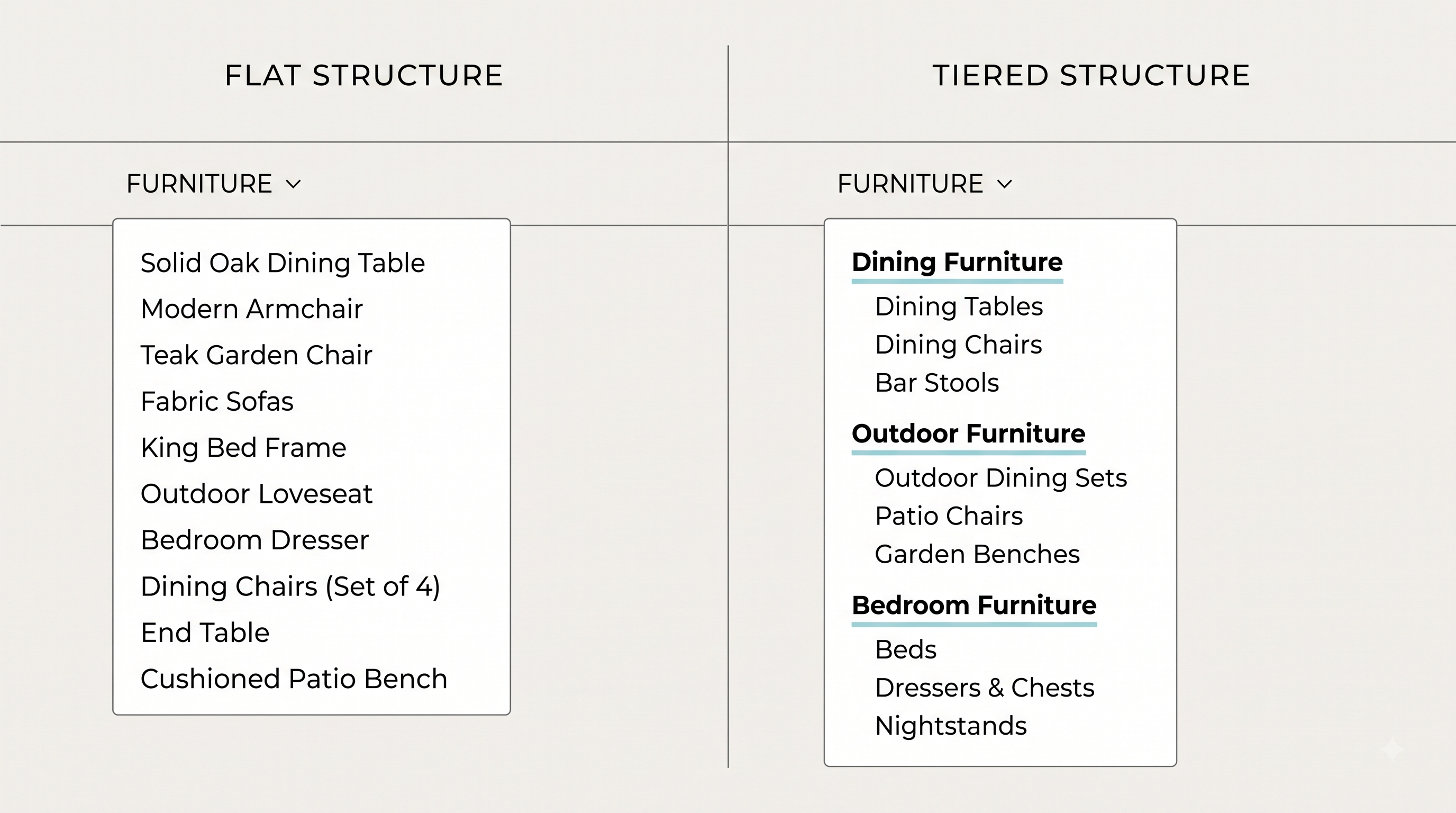
Poor architecture: One "Furniture" collection (380 products), one "Sale" collection, nothing else. A shopper searching "outdoor dining table" lands on the homepage or a generic furniture grid and has to filter manually. Google has no page to rank for that phrase because one doesn't exist.
Good architecture: "Furniture" as a parent category, with "Dining Furniture," "Outdoor Furniture," and "Bedroom Furniture" underneath it, each further split only where the catalog actually supports it (an "Outdoor Dining Sets" collection only makes sense once you're carrying 15+ relevant SKUs, not 4). Every collection maps to a phrase someone would actually type into Google.
One more input to that math as of 2026: collections can now target specific product variants instead of only whole products. A "Valentine's Red Edit" pulling just the red and pink variants across your catalog no longer needs a separate tagging scheme or a manually maintained list, it's a native collection type now. That takes some pressure off creating a full standalone collection for every micro-segment; a few of those are better served as a variant-level collection than a new top-level one.
The rule of thumb: if you can't name the search query a collection is meant to catch, you probably don't need that collection yet.
Building a collection on Shopify: manual, smart, or both now
For most of Shopify's history, building a collection on Shopify meant picking a side: manual, where you choose every product by hand, or smart, where Shopify adds anything matching conditions you set, up to 60 conditions, up to 5,000 smart collections per store. You couldn't mix the two, and you couldn't convert one type to the other after creation.
That trade-off is going away. As of the July 2026 update, one collection can combine condition-based sources, hand-picked products, and manual exclusions together, in a set display order. A "New Arrivals" collection can auto-include everything added in the last 30 days while keeping a few hand-picked bestsellers pinned at the top, in a single collection instead of two.
If your store is still on the legacy model, the old advice still applies until you migrate: decide manual vs smart at creation, because converting later still means rebuilding the collection and carefully moving the URL handle and SEO fields over. Once you're on the new model, that specific constraint mostly disappears, though it's still worth deciding deliberately which parts of a collection should be rule-based and which should stay a human call. "Everything automated" and "nothing automated" are both easier defaults than a considered mix, and both produce a worse collection.
If you're still on the legacy model, we go deeper on the setup mechanics in how to organize your Shopify products into collections that scale.
Structuring a collection on Shopify for search
Structure, not word count, is what separates a collection page that ranks from one that doesn't. Two things matter more than anything else:
- Where the description text sits. A short, genuinely useful paragraph above the product grid gives Google (and increasingly, AI answer engines pulling from category pages) something to read before it hits a wall of product cards. Copy that exists purely to hit a word count does more harm than good, both to rankings and to the person actually trying to shop.
- The heading hierarchy. One H1 (usually the collection title, set automatically by most themes), and if you're adding on-page copy, keep any subheadings below it as H2s. This sounds basic. It's the single most common on-page error we find in collection audits.
The filter and facet layer sits on top of this and deserves its own decision tree: which filtered views (color, size, price band) are worth their own indexable page, and which should stay as a URL parameter that Google never sees. Get this wrong at scale and you either bury Google's crawl budget in thousands of near-duplicate filtered URLs, or you miss ranking for filtered queries with real volume behind them ("black leather sofa" is a real search, not just a filter click). We break down exactly how to make that call in structuring categories and filters for SEO.
Collection SEO: URLs, titles, descriptions, canonicals
Four fields, four different jobs. Getting any one wrong quietly caps a collection page that's otherwise doing everything right.
URL handle. Shopify defaults this to the collection title. /collections/mens-running-shoes beats /collections/collection-47, but the real risk isn't a bad handle, it's changing a good one after the page has indexed. A handle change without a redirect breaks every backlink and search result pointing at that URL. Audit handles once, early, and then leave them alone.
Meta title. Shopify auto-generates this from the collection name, and it's almost always worth overriding. A generated title reads "Running Shoes – Your Store Name." A written one can lead with how people actually search: "Men's Running Shoes: Road & Trail Styles." Keep it under 60 characters so it doesn't truncate in search results.
Meta description. This doesn't affect rankings directly, but it's the difference between a click and a scroll-past. Write it as a reason to click, what's in the collection, what makes it worth a look, not a restatement of the title. Under 155 characters.
Canonical tags. Shopify sets a self-referencing canonical on every collection page automatically, so this mostly stays out of your way. The place it bites merchants: filtered or sorted views of a collection (?sort_by=price-ascending, ?color=red) can generate URLs that need to canonicalize back to the base collection page, or you end up with dozens of near-duplicate URLs competing with each other in search. If you're using an app or custom filter setup, confirm it's canonicalizing filtered views correctly, this is one of the more common technical issues we find in collection audits and one of the least visible from inside the Shopify admin.
Sort order and merchandising
Sort order is a merchandising decision wearing an SEO costume. It determines which products a shopper sees first, and by extension, which products actually sell.
Shopify's built-in options (best-selling, price, alphabetical, newest, manual) cover most cases, but the default of "manual" left untouched is where collections quietly rot. A collection sorted manually in 2024 and never revisited is still showing 2024's bestsellers first, regardless of what's actually selling or in stock today.
The out-of-stock problem is the specific version of this worth calling out on its own. A shopper clicking into a collection and landing on three sold-out products before they see anything purchasable is a conversion killer that has nothing to do with your product and everything to do with sort order. This is one of the more common blind spots we've noticed in Shopify collection audits generally, and it's a genuinely hard thing to catch by eye across a catalog of any size, because the collection page looks completely normal to you every time you check it manually.
This is a place worth naming the tool directly: RankCollections watches for exactly this pattern; it flags out-of-stock products sitting in prime collection real estate and can push them toward the bottom automatically, so the dead-end never reaches a shopper in the first place. It's not the only fix (a manual sort review on a schedule works too, it just doesn't scale past a few hundred SKUs), but it's the one that doesn't depend on you remembering to check.
We cover sort order, filter UX, and product card layout in full in collection page CRO: turning category browsers into buyers.
Collection images and consistency
Inconsistent collection images are one of those problems that's invisible from any single product page and glaring the moment you view collections side by side in your admin. A grid with some square images, some portrait, some with white backgrounds and some lifestyle shots, reads as unfinished even when every individual photo is good.
The fix isn't complicated, it's just tedious to retrofit: pick one aspect ratio, one background treatment, and one crop style, and apply it to every collection's featured image before you scale further. Alt text matters here too and gets skipped constantly on collection-level images specifically (product image alt text tends to get more attention than the collection thumbnail itself).
Nesting and sub-collections
Picture a mid-sized activewear store. It has three solid collections: Leggings, Tops, Shorts. Each one targets its own search term and each one converts fine on its own.
The problem shows up the moment someone searches "activewear" instead of any one category. There's no page for that. The store either builds a fourth collection and manually copies products into it, or it lives with the gap.
That's the exact problem Shopify's July 2026 collections update was built to close. Collections can now be assembled directly from other collections, no manual copying required. Build an "Activewear" collection straight from the existing Leggings, Tops, and Shorts collections, no new product list. Add a new legging to the catalog, or update any of the three source collections, and Activewear updates itself.
That one change is worth rethinking your architecture over. The old trade-off was: go broad and lose search intent, or go narrow and fragment your catalog across pages with nothing tying them together. Nesting removes the trade-off. Build the narrow collections for search intent first, each one earning its own keyword, then roll them into a parent collection for the broader term and for navigation. No product gets assigned twice.
Two more pieces of the same update are worth knowing about, even outside this specific use case. Shopify's Sidekick assistant can now build and edit a collection from a plain-language prompt, handling the tagging and automation setup itself. And a collection can now pull a source from a connected app instead of only your own catalog. Neither one changes the architecture call above, but both are worth knowing exist before you spend an afternoon manually building something Shopify now does natively.
The honest limitation: nesting only helps if what's underneath it is already clean. Nest three overlapping, poorly-scoped collections together and you've just moved the mess up one level instead of fixing it. Sort out the base layer first, then nest.
The 7 mistakes that cost merchants traffic and sales
- One collection per major category, nothing underneath it. This is the single most common structural mistake we see, and the most expensive one in lost search visibility.
- Manual collections doing work automation could now handle, whether that's converting to a smart collection on the legacy model or layering conditions onto an existing collection on the new one.
- No description copy, or copy stuffed with the keyword instead of written for a person. Both hurt. An empty collection page gives search engines nothing to work with; keyword-stuffed copy gets skimmed and skipped by shoppers and increasingly by AI answer engines pulling from the page.
- Sort order left on default and never revisited, letting out-of-stock or discontinued products sit above what's actually selling.
- URL handles that are auto-generated and meaningless, or worse, handles changed after the page has indexed with no redirect set up.
- Collection images with no consistent treatment, which reads as unfinished storefront-wide even when the products themselves are strong.
- No internal linking into collection pages from blog content or other collections, leaving pages that could be ranking with almost no signal telling Google they matter.
None of these individually will sink a store. Stacked across a catalog of any real size, they're the difference between a collection structure that compounds and one that quietly caps your organic growth.
Where RankCollections fits into this
RankCollections handles the maintenance layer for everything above, once your architecture decisions are made. It does everything for you like:
Removes out-of-stock dead-ends automatically. It scans your collections for products sitting out of stock in prime position, the exact sort-order problem covered earlier, and pushes them toward the bottom so shoppers don't hit them first.
Surfaces new collection opportunities. It looks at your current catalog and at how competitors in your category have structured theirs, and flags collection gaps worth filling, so you're not building your next 10 collections purely off instinct.
Tracks competitors on an ongoing basis, not just as a one-time audit, so new gaps get caught as your category shifts.
Runs a free collection health score in under a minute, a quick first read on where your current collections stand before you touch anything else in this guide.
Works entirely through Shopify's API, read-only, no theme edits, no scripts added to your storefront, so it doesn't touch page speed or Lighthouse scores. Every change it makes is logged with a history you can review or undo.
Free plan covers your first 5 collections. Scaling past that moves to the paid tier.
A Shopify collection audit checklist
Copy this into a doc and run it against your top 10 collections by traffic:
- Does the collection map to a specific search phrase, or is it too broad to rank for anything in particular?
- Is it manual, smart, or a multi-source mix, and does that match how often the underlying products actually change?
- Does the URL handle describe the collection, or is it an auto-generated slug?
- Is there a short description above the product grid, written for a shopper, not stuffed with keywords?
- Is the heading hierarchy clean, one H1, no H3 before an H2?
- Is sort order intentional, or still on whatever the default was when the collection was created?
- Are any out-of-stock products sitting in the first two rows?
- Does the featured image match the aspect ratio and style of every other collection?
- Does the image have real alt text?
- Is there at least one internal link pointing into this collection from a blog post or another collection?
- If this collection could be a parent for 2+ narrower collections, has that nesting been built yet?
FAQ
How many products should a Shopify collection have?
There's no fixed number, but 15 to 40 is a workable range for most category-level collections. Fewer than that and you likely don't need a standalone collection yet; more than that and consider splitting by a real attribute customers search on.
Can I change a manual collection to a smart collection later?
On Shopify's legacy collections model, no, you'd need to rebuild the collection and migrate the URL handle and SEO fields by hand. On the new model that rolled out in July 2026, this matters less: a single collection can combine automated conditions with hand-picked products, so you can add rule-based sources to an existing curated collection without starting over. Check which model your store is on before you plan around either behavior.
Do collection pages need their own meta title and description?
Yes. Shopify generates default SEO fields automatically, but they're almost always worth overriding with copy that matches how people actually search for that category, rather than just reusing the collection name.
How many collections is too many for a Shopify store?
There's a hard platform limit of 5,000 smart collections, but the practical ceiling is much lower: once collections start duplicating the same handful of products with no distinct search intent behind them, you're fragmenting traffic rather than capturing more of it.
Does nesting collections hurt SEO?
No, when the underlying collections are already well-structured. A nested parent collection is a legitimate way to serve both broad category searches and the narrower sub-category searches underneath it, as long as you're not just duplicating the same products across pages with nothing distinct to say about each one.
Ready to stop auditing collection health by hand? Install RankCollections and run your first collection health check in under two minutes.