How to Change Product Order in Shopify Collections (5 Methods)

How to Change Product Order in Shopify (5 Methods)
There are five ways to change product order in Shopify: manual drag-and-drop, the built-in sort options, the sort_by URL parameter, theme-level Liquid code, and a merchandising app. Which one fits depends on your catalog size and how often the order needs to change — but the more useful question is what order should actually be selling.
Quick reference:
| Method | Best for | Setup time |
|---|---|---|
| Manual drag-and-drop | Small, curated collections | 2 min |
| Built-in sort options | No-code, standard signals | 1 min |
sort_by URL parameter | Campaign links, custom nav | 5 min |
| Liquid / theme code | Developer-set defaults | 30+ min |
| Merchandising app | Ongoing automation | 10–20 min |
What order should your products actually be in?
This is the part most guides skip. Shopify's admin will let you sort by price, date, or title, but none of those tell you what should actually happen.
A few honest tradeoffs:
- Bestsellers first converts well because it's social proof, but it also means your newest and highest-margin products never get seen.
- Margin-first protects profit, but if your highest-margin item is also your least-known one, you're asking cold traffic to take a bigger risk than they're ready for.
- Inventory-aware ordering (push low-stock or sold-out items down) prevents dead clicks, but it's invisible in Shopify's native tools, nothing in the admin looks at stock level when deciding order.
- Newness works for fashion and seasonal catalogs, badly for anything with a long buying cycle.
Most stores land on a blend: manually pin two or three strategic products up top, then let an automatic rule handle the rest. If you haven't settled on a collection structure yet, our guide to organizing Shopify collections is worth reading first, product order only matters once the grouping itself makes sense.
Manual drag-and-drop and why it stops working past ~100 products
- Go to Products > Collections
- Open the collection
- Under Sort, choose Manually
- Click Sort products, then drag items into position
- Click Save order
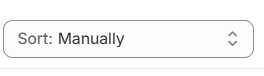
This works well under roughly 50–100 products. Past that, it breaks down for a simple reason: nothing updates it for you. A product sells out, a manually-sorted collection doesn't know, and the sold-out item sits in row one until someone remembers to move it. On a 300-SKU catalog, that's not a one-time setup cost, it's a recurring chore nobody owns.
Shopify's built-in sort options, and what each really does
Under Sort, the non-manual options are:
- Best selling — a running count of orders containing that product, going back to whenever the product started selling. It's not a recent-sales snapshot, and it doesn't account for margin like a high-volume, low-margin item can outrank something that makes you three times as much per sale.
- Alphabetical (A-Z / Z-A) — literally title order. Useful mainly when customers are browsing by name.
- Price (low-high / high-low) — useful for budget-conscious categories, but it puts your cheapest item first, which isn't always your best foot forward.
- Date (oldest-newest / newest-oldest) — good for fashion drops and seasonal stock, not much else.
The thing worth remembering: whichever one you pick applies globally, to every visitor, on every device, all the time. There's no "show bestsellers to new visitors, manual order to returning ones."
Liquid and sort_by URL parameters
Every collection URL accepts a sort_by query parameter, which is useful for linking directly into a specific view from an email, ad, or nav menu without touching the collection's default setting.
1https://yourstore.com/collections/summer-sale?sort_by=best-selling
2https://yourstore.com/collections/summer-sale?sort_by=price-ascending
3https://yourstore.com/collections/summer-sale?sort_by=created-descending
Valid values, per Shopify's own Liquid reference: manual, best-selling, title-ascending, title-descending, price-ascending, price-descending, created-ascending, created-descending.
Copy-paste for common campaigns:
- Email blast to bestsellers:
?sort_by=best-selling - Ad campaign landing on newest stock:
?sort_by=created-descending
Drop either onto the end of any collection URL and link straight to that view, no theme changes needed.
If you want to hardcode a default sort into the theme itself rather than relying on the customer picking one, that's set on collection.default_sort_by in your collection.liquid (or main-collection-product-grid.liquid on newer themes) — a theme developer task, not a five-minute one.
When you need an app (and when you don't)
If you're manually re-sorting the same collection more than once a week, or juggling rules like "promote in-stock, demote anything under 5 units, keep new arrivals in the top row" by hand, that's the point where a dedicated sorting/merchandising app earns its subscription. Doing that by dragging products every Monday morning doesn't scale past a handful of collections.
If you're not doing that, and your catalog is small enough that "best selling" or an occasional manual reorder covers it, you don't need an app for order alone. Adding one is just another subscription managing a problem you don't have yet.
RankCollections handles the collection side of this differently. It generates and maintains the collections themselves, building SEO-structured collection pages from your store data and removing out-of-stock products from them automatically, so a top-row item doesn't sit there as a dead click after it sells out. It sorts the products using AI sorting on top of the collections it builds, so you don't have to manually re-sort them yourself.
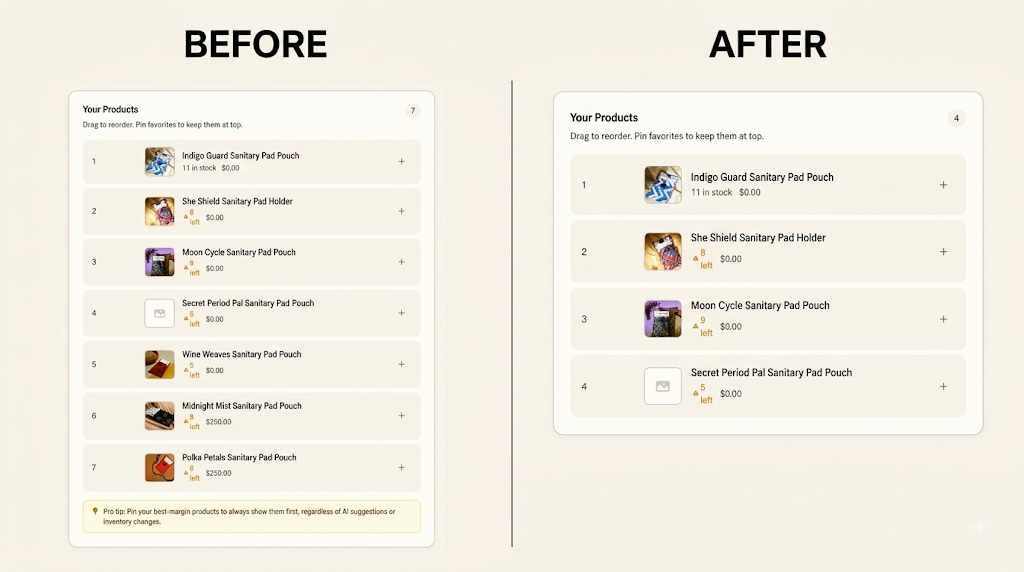
Try RankCollections free in the Shopify App Store
How sort order affects conversion rate and SEO
On a collection page, the first row gets a disproportionate share of clicks and everything past the third scroll gets close to none. That makes sort order a conversion lever, not just a display setting: an out-of-stock product sitting in position one is a dead click every single visitor pays for.
It also matters for SEO in a way that's easy to miss. Google and AI answer engines both use the order and structure of a collection page as a signal for what the page is actually about, a collection that leads with your three least-relevant products (because that's where "Newest first" happened to put them) sends a weaker relevance signal than one that leads with what the category is actually known for. If you're optimizing collection pages for AI answer visibility specifically, our guide to collection pages and AI Overviews goes deeper on that side of it. For the fuller SEO picture beyond just sort order, our Shopify collection SEO guide is the natural next stop.
Which method fits your store?
- Under 50 SKUs → Manual drag-and-drop. Fast enough to redo by hand, no setup needed.
- 50–500 SKUs, order changes occasionally → Built-in sort options, or a
sort_byURL for specific campaigns. - 500+ SKUs, or order needs to change daily → A merchandising app. Manual and semi-manual methods stop scaling here.
- Problem isn't order, it's which collections exist at all → That's collection generation, a different layer entirely.
FAQ
Does changing product order affect SEO rankings directly?
Not as a direct ranking factor, but indirectly, yes. Order affects which products get clicked, which affects engagement signals, and it affects how clearly the page communicates relevance to both search engines and AI answer engines.
What's the default sort order on a new Shopify collection?
Manual, with products added in the order you added them which is arguably no strategy at all until you actively set one.
Can I set a different sort order for mobile vs. desktop?
Not natively. Shopify's sort order is one setting per collection, applied everywhere.
Will Shopify automatically move out-of-stock products down?
No. None of the built-in sort options factor in stock level. That's a manual check or an app's job.
Share this article