Black Friday 2026: The Shopify Collection Playbook (BFCM)

Black Friday 2026: The Shopify Collection Playbook (BFCM)
Getting ready for Black Friday on Shopify isn't really a discounting problem. It's a collections problem: which products you feature, in what order, and what happens the moment one of them sells out. Get the collection structure right and the discounts do their job. Get it wrong and you're driving BFCM traffic straight into dead ends.
Most BFCM guides cover the same ground: build urgency, test your checkout, hire extra support. All true, and none of it answers the question that actually determines whether your sale converts, which is what your collection pages look like at 11pm on Black Friday when half your stock is gone.
The BFCM collection timeline: October vs November
Collection work for BFCM splits cleanly into two phases, and mixing them up is the most common way merchants run out of time.
October is structural work. This is when you decide which sale collections you're building, how they'll be tagged, and how they'll sit alongside your existing category pages. Structural changes need time to get indexed and to settle in Google's understanding of your site. If you're still creating your "Black Friday Deals" collection in the third week of November, it has no chance to pick up any organic visibility before the event ends.
October checklist:
- Decide your sale collection structure (see the next section)
- Set up the tags or metafields you'll use to populate them
- Write collection descriptions and title tags now, not on launch day
- Confirm which products are eligible for the sale and flag low-stock items early
November is operational work. By November you're not making structural decisions, you're loading inventory, checking sort order, and rehearsing what happens when a product sells out mid-scroll. This is also when you schedule the actual publish and unpublish dates for sale collections, so nothing depends on someone remembering to click a button at midnight.
The reason this split matters for a permanent playbook: the phase boundary doesn't move, only the dates inside it do. Treat "October" and "November" as the two headers and swap the specific dates each year underneath them.
Building sale collections that don't cannibalize your normal ones
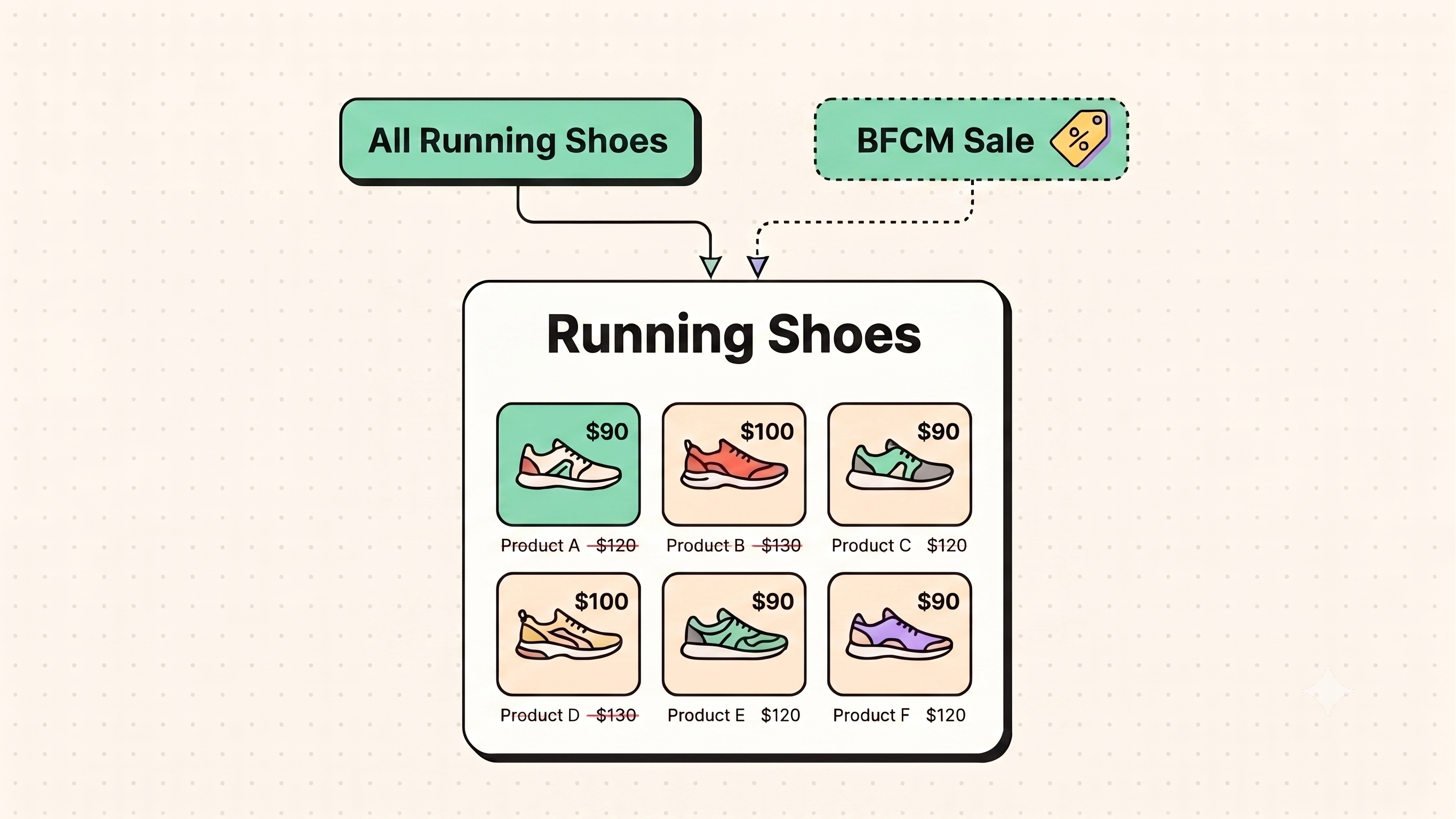
The instinct is to build one big "Black Friday Sale" collection and move your best sellers into it. That's the fastest way to create two problems at once.
SEO cannibalization. If your sale collection and your regular category collection show the same products with near-identical titles and descriptions, you're now competing with yourself for the same search terms. Google has to pick one, and it won't always pick the one you want.
Merchandising cannibalization. Pulling your best sellers out of their normal collections to feature them in a sale collection guts the collections that any BFCM shopper landing from a direct or branded search will actually browse. Your "Men's Running Shoes" page now looks thin in the exact week it gets the most traffic.
The fix is additive, not extractive. Build sale collections as a layer on top of your existing structure using a discount tag or metafield, not by moving products out of where they already live. Products stay in their normal collections, sale collections pull the same products in through the rule, and each page gets its own distinct title tag and description so they're not duplicates of each other.
The same rule that keeps two of your collection pages from competing with each other in a normal month applies here, just compressed into six weeks instead of spread over a year. Our guide on structuring collection pages for AI and search citation goes into the heading and schema patterns that make Google treat a page as its own distinct entity rather than a near-duplicate. Apply the same pattern to your sale collection and it won't cannibalize the category page it's pulling from.
Sort order during a sale: scarcity, margin, and stock
Default "best selling" sort order is a reasonable baseline the other 11 months of the year. During BFCM it actively works against you, because it surfaces whatever already had momentum, not what you actually want to move.
Three things should be steering sort order during the sale, not just one:
1. Margin
A blanket 30% off everything treats a low-margin item and a high-margin item as equally worth featuring. They aren't. Weight your top-of-page real estate toward products where the discount still leaves you healthy margin, not just the ones with the biggest discount badge.
2. Stock depth
A product with 6 units left shouldn't sit at position one in a collection getting thousands of visits. It will sell out in the first hour, and everyone who arrives after that hits a dead product page. Save the top slots for items with stock to actually support the traffic.
3. Genuine scarcity, used honestly
If a product is limited edition or genuinely low-stock, say so and let that scarcity work for you. Don't manufacture urgency on items that aren't actually scarce. It reads as dishonest the moment a shopper notices the same "only 3 left" badge two weeks later.
Sorting collections by these three factors simultaneously is exactly the manual work that becomes unmanageable at any real catalog size. RankCollections is built to help you with that, it reads live inventory and applies sort rules automatically instead of someone rebuilding the order by hand every few hours during the exact week they have the least time to do it.
Create your first 5 collections for free now.
Handling sell-outs mid-event without killing the page
This is the part most BFCM prep skips entirely, and it's the difference between a sale that keeps converting and one that quietly bleeds trust for four days straight.
When a featured product sells out mid-event, you have three options, and only one of them is good:
- Leave it visible with no stock indicator. Worst option. Shoppers click through, hit a sold-out product page, and now doubt every other listing on the collection.
- Delete or unpublish the product page entirely. Also bad. You lose any backlinks or search equity that page had, and anyone who bookmarked or shared it hits a 404 in the middle of your highest-traffic week.
- Push it down or flag it clearly, keep the page live. Correct. Move sold-out items to the bottom of the collection automatically, mark them clearly, and if you have a similar in-stock product, surface it as an alternative right there. The page stays indexed, the shopper isn't dead-ended, and you haven't thrown away SEO equity for a four-day sale.
RankCollections out-of-stock handling exists as a background process rather than a manual task: during BFCM, inventory can shift multiple times an hour, and checking collection pages by hand every hour isn't a realistic plan for a small team. Worth saying plainly though, automation here doesn't replace having someone glance at your top collections at least once a day during the event. It removes the manual grind, not the judgment call.
Start creating your first collection for free now.
What to do with sale collections on December 1
This is the part almost every BFCM guide forgets, because most of them stop at "run a great sale" and never say what happens the morning after.
Don't delete the collection. If it ranked or drove traffic during the event, deleting it throws away the backlinks, indexed history, and any search equity it built up over the six to eight weeks it was live.
Don't leave it live and unedited either. A "Black Friday 2026" collection still showing full price in February is a bad look and a missed SEO opportunity.
Three real options, pick based on how the collection performed:
- Unpublish and archive. Simplest option for collections that were purely promotional and won't be reused.
- Repurpose into an evergreen page. If the collection ranked well, keep the URL and rework it into a general "best sellers" or "customer favorites" page rather than starting over next November. This is the same logic behind building pages that keep earning organic traffic instead of expiring with the campaign: a page with six weeks of accumulated signal is worth more reused than rebuilt.
- Schedule it to return. If you're confident you'll run the same structure next year, keep the collection, unpublish it, and set a reminder to republish and re-tag it next October rather than rebuilding from scratch.
Whichever you choose, make the decision within the first week of December. Sale collections left live and stale for months are one of the more common sources of the "why is this old promo page still ranking for the wrong thing" problem merchants find in audits the following year.
The BFCM collection checklist
October
- Sale collection structure decided
- Distinct title tags and descriptions written for each sale collection
- Low-stock, high-demand products flagged early
- Sort rule defined: margin + stock depth + honest scarcity, not just discount size
November
- Inventory loaded and stock levels confirmed per collection
- Sold-out handling in place: push to bottom, flag clearly, no unpublishing
- Backup product substitutions identified for likely sell-outs
- Publish and unpublish dates scheduled, not manual
During the event
- Top collections checked at least once daily for sold-out drift
- Sort order re-verified after any major inventory shift
December 1
- Decision made within the first week: archive, repurpose, or schedule to return
- If repurposing, canonical and title tag updated to match new intent
- Performance recorded (what sold, what sold out, what stalled) for next year's version of this same checklist
FAQ
Do I need a separate collection for Black Friday, or can I just discount products in place?
A separate, tag-based sale collection is worth the setup. Discounting in place is faster but makes it hard to control sort order, feature the sale distinctly in navigation, or clean up afterward without touching your permanent catalog structure.
Should sale collections be noindexed to avoid duplicate content?
Not usually. If each sale collection has its own distinct title, description, and clear purpose, it's not duplicate content, it's a legitimate page. Noindexing throws away any chance of it ranking during the exact weeks people are searching for exactly that.
What's the biggest mistake merchants make with BFCM collection sort order?
Sorting purely by discount percentage. It's the fastest way to feature your lowest-margin, lowest-stock products at the top of the page, which is the opposite of what you want during your highest-traffic week.
How far in advance should sale collections go live?
Structurally, they should exist by October so they have time to get indexed. Whether they're publicly visible or gated behind a "coming soon" state before the sale actually starts is a separate decision, and either works.
Is it worth keeping a Black Friday collection page live year-round?
Only if you're repurposing it into something evergreen, like a general best sellers page. A page still labeled "Black Friday 2026" in June looks abandoned and can hurt more than help.
RankCollections handles the parts which you can't scale by hand: automatic sort order based on live stock and demand, out-of-stock products pushed down instead of left dead in the middle of a sale, and a running check on what your competitors are doing with their own collections while you're focused on running yours.
Install RankCollections for free from the Shopify App Store now.
Share this article