Category Page SEO for Ecommerce: The Complete Guide

Category Page SEO for Ecommerce: The Complete Guide
Category page SEO is the practice of optimizing the pages that group your products together, like /collections/mens-running-shoes, so they rank for the searches people make before they've picked a specific product. Get it right and these pages become your highest-value real estate: broad, high-intent traffic no single product page can capture. Get it wrong and Google quietly treats them as thin, duplicate, or not worth showing.
This guide covers what actually works, what belongs on a category page, how to structure titles, URLs and pagination without wrecking your crawl budget, and how to fix the thin categories that cap most stores' traffic without anyone noticing.
Why category pages outrank product pages for commercial terms
Category pages outrank product pages on commercial terms because the search intent at that stage is comparative, not decided. Someone searching "waterproof hiking boots" hasn't picked a brand yet. A category page can answer the whole query with one page and a full set of options. A single product page can only ever answer for itself.
This is why category pages consistently rank for the head terms in a niche while product pages pick up the long tail underneath them. Google can serve one collection page to satisfy a query with many acceptable answers, instead of guessing which single product the searcher wants.
The same logic holds for AI answer engines, arguably more so. A category page that states clearly what it covers and who it's for gives an AI Overview or a chatbot a single quotable answer, instead of forcing it to stitch one together from ten separate product listings.
What content belongs on a category page: above vs below the product grid
The most common mistake is treating this as one decision instead of two. What goes above the grid and what goes below it are different jobs.
Above the grid: a short paragraph, two to four sentences, that confirms the shopper landed in the right place and states what the collection actually covers. This is also where your primary keyword and its closest variants belong, worked in naturally. It should not push the products below the fold. If a shopper has to scroll past a wall of text to see anything for sale, that block is too long.
Below the grid: this is where the real depth goes. Buying considerations, sizing or fit notes, care instructions, a short comparison of subcategories, and your FAQ section. Google and AI search tools read this content just as well down here, and it doesn't get in the way of someone who already knows what they want.
Product-level detail belongs on product pages, not here. A category page that tries to say everything about every product in it usually ends up saying nothing specific about any of them.
Category page titles, meta descriptions and H1 patterns that work
A reliable pattern for the H1 and title tag is Modifier plus Category plus Qualifier: "Men's Waterproof Hiking Boots, Free Returns" rather than a generic "Hiking Boots" or a keyword-stuffed string of every variant you'd like to rank for.
The H1 should closely mirror the title tag but doesn't need to match it word for word. Keep it specific to what's actually in the collection: "Waterproof Hiking Boots" is a better H1 than "Boots" if that's genuinely the scope of the page, and it's a worse H1 than "Boots" if the collection actually contains sandals and trail runners too. Match the H1 to the real contents, not the keyword you wish it targeted.
Meta descriptions should read as a reason to click, not a summary of the page. Lead with what makes this specific collection worth the click: the size of the assortment, a filter nobody else offers, free shipping over a threshold. Keyword stuffing here doesn't help rankings and it does hurt click-through.
URL structure, handles and why changing them is dangerous
Keep handles short, descriptive and stable: /collections/waterproof-hiking-boots, not /collections/c-4471-boots-cat. A URL a human can read and guess is also one search engines parse cleanly.
The dangerous part is changing a handle after it's live. The old URL stops existing, which means anyone who bookmarked it, any external site that linked to it, and any accumulated ranking signal tied to that exact URL are all at risk unless you handle the transition properly. If you restructure a collection, set a 301 redirect from the old handle to the new one and leave it in place indefinitely. Don't chain redirects through two or three old URLs, and don't assume your platform's automatic redirect prompt fired correctly. Check it.
If you're consolidating two overlapping collections into one, the same rule applies: redirect, don't just delete.
Pagination, faceted navigation and canonicals
Filters and sort options multiply URLs fast. A collection with five filter types and a handful of values each can generate thousands of distinct filtered URLs, most of them thin or near-duplicate versions of the same page.
Google's own guidance on this is to block unnecessary faceted URLs through robots.txt or URL fragments, and where indexing is genuinely needed, to use standard URL parameter separators, keep filter order consistent, and return a real 404 for filter combinations that produce no results. Canonical tags help, but they're a slower, secondary signal, not a substitute for controlling what gets crawled in the first place.
For pagination specifically: don't blanket-canonicalize every paginated page back to page 1 if page 2 and beyond show products a shopper genuinely can't reach any other way. That erases real content from search, not just duplicates. Reserve self-referencing canonicals for the filtered or paginated views that actually have search demand behind them, and check your platform's default behavior rather than assuming it's handled. Do check out our full robots.txt guide if you need help setting this up on Shopify.
Thin category pages: the most common cause of category SEO failure
A thin category page isn't always obviously thin. The most common version is a page that used to be fine and quietly degraded: products went out of stock, nobody removed them from the collection view, and the page slowly filled up with dead-end listings while the copy around it stayed the same.
Picture two versions of the same collection, "Organic Cotton Baby Blankets."
Before: A bare product grid, twelve items showing, four of them grayed out as out of stock. No text above or below the grid. The title tag is the platform default: "Organic Cotton Baby Blankets." No FAQ, no sizing or material information anywhere on the page.
After: Same underlying catalog, but the four out-of-stock items are hidden from the storefront view (still in the system, just not shown to shoppers), so every visible product is actually buyable today. A three-sentence paragraph above the grid explains what makes the cotton organic-certified and who the blankets fit. Below the grid: a short sizing guide by age, a note on the certification with a link to the certifying body, and three FAQ entries pulled from real customer questions.
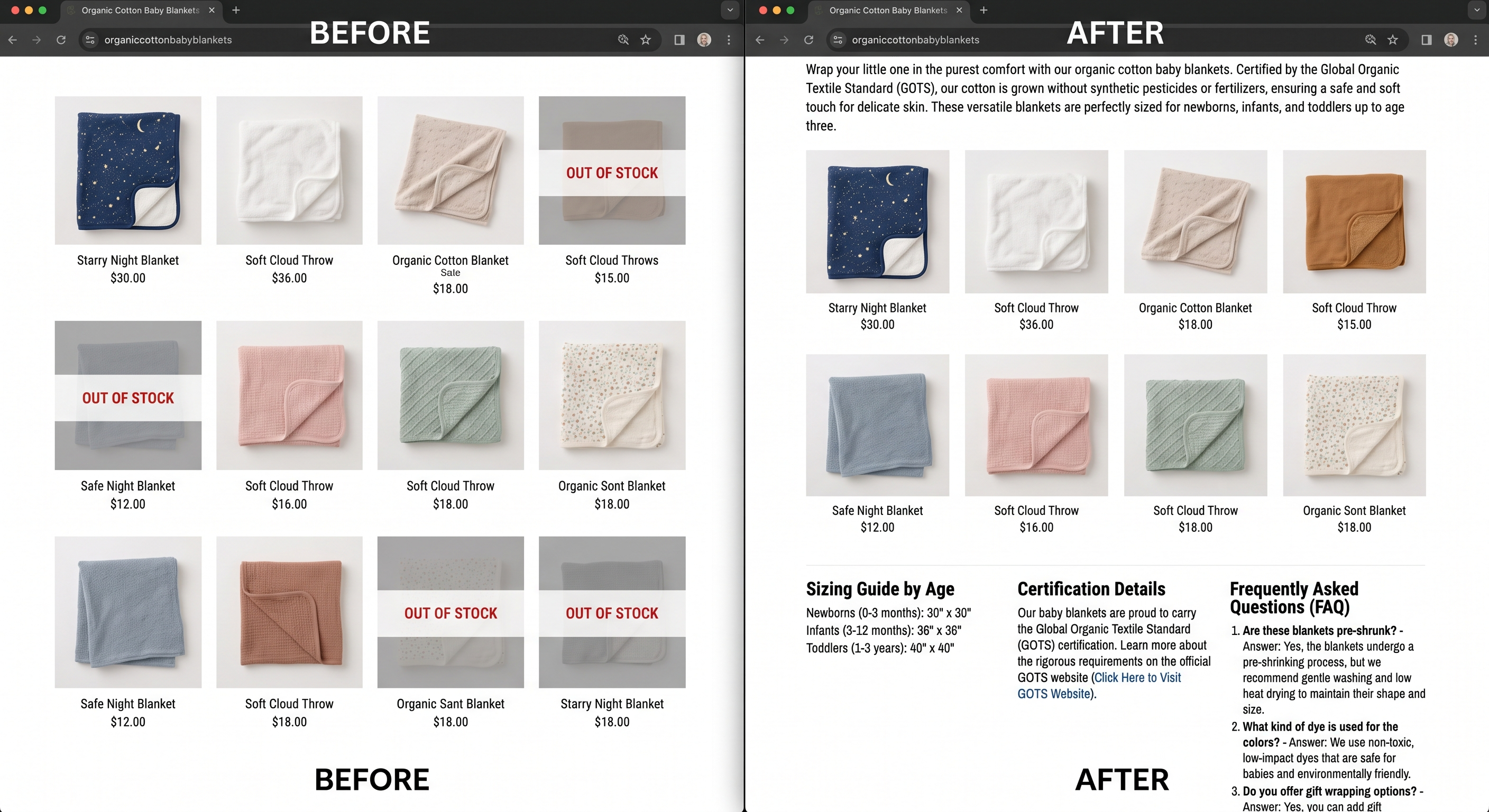
Nothing about the products changed between the two versions. What changed is that the "after" page gives a search engine, an AI answer engine, and a shopper three real reasons to trust it: it's current, it's specific, and it answers questions instead of just displaying items.
Out-of-stock products sitting unnoticed in a live collection are one of the most common ways a page turns thin without anyone deciding to make it worse. This is one problem worth checking with a tool rather than eyeballing your catalog: RankCollections runs a free collection health audit that scans your public collections specifically for this, flags which ones are showing out-of-stock products, and gives you a health score with an estimate of how much of that traffic is landing on dead ends. It's a diagnostic, not a fix on its own, but it tells you exactly where to start.
Internal linking between categories
Category pages should link to each other, not just down to products. Parent collections should link to their subcollections, and closely related collections should cross-link where it's genuinely useful to a shopper: "Waterproof Hiking Boots" linking to "Hiking Socks" in a short related-collections block, for instance.
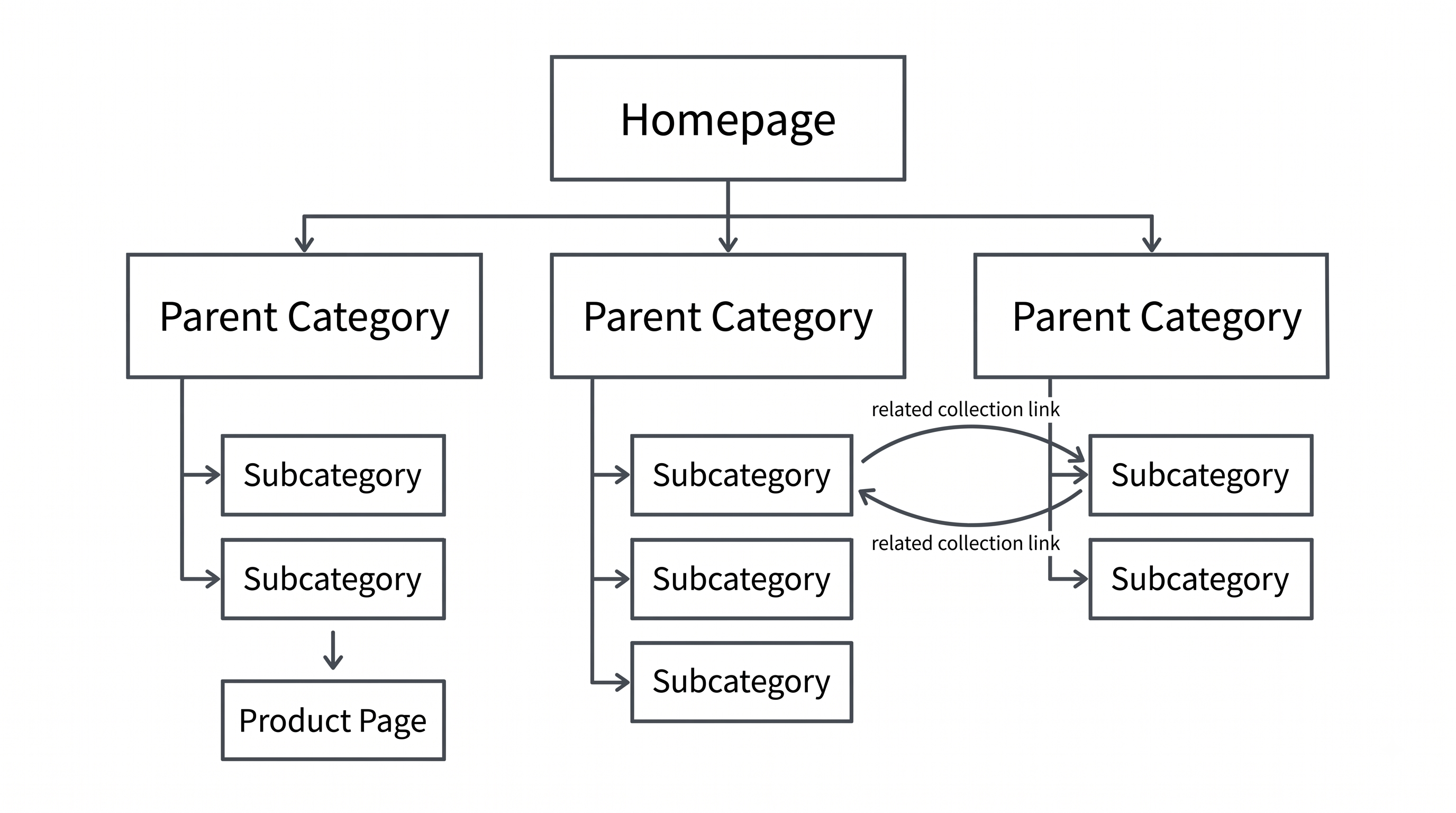
Anchor text matters more here than most stores treat it. "Shop now" tells a search engine nothing about the linked page. "Waterproof hiking boots for wide feet" tells it exactly what to expect. We've covered anchor text patterns in more depth here if you want the full breakdown.
Breadcrumbs help too, both for users and for establishing the category hierarchy in a way search engines can parse cleanly. If your platform generates breadcrumbs automatically, check that they reflect your actual collection structure rather than a generic fallback.
Doing this on Shopify specifically
Shopify gives you two collection types: manual, where you add products yourself, and automated, where products get added based on conditions like tags or product type. Automated collections save time at scale but need conditions that are specific enough to avoid pulling in products that don't belong.
Most Online Store 2.0 themes handle canonical tags for filtered and paginated collection pages automatically, but "most" isn't "all." Check yours rather than assuming. Shopify's Search & Discovery app also caps the number of filters shown once a collection passes 5,000 products, which is worth knowing if you're planning a large catalog's filter structure ahead of time.
The harder problem on Shopify usually isn't the technical setup, it's knowing which collections you're missing in the first place. If you've got 50 to 100+ SKUs and no real category structure yet, you're likely invisible for a whole tier of category-level searches without realizing it. This is the gap RankCollections is built for: it looks at your catalog and at collections comparable stores have built out, flags the gaps, and keeps monitoring your live collections for the out-of-stock issue covered above so pages don't quietly go thin over time. The free plan covers your first five collections, enough to test the idea against a slice of your catalog before deciding whether to expand it.
Install RankCollections free on the Shopify App Store
A category page SEO checklist
- Target keyword in the H1, and in the first 100 words above the grid
- Short, specific intro paragraph above the grid, deeper content and FAQ below it
- Title tag under 60 characters, meta description under 155 and written as a reason to click
- Short, descriptive URL handle, with a 301 redirect in place if it ever changes
- Filtered and paginated URLs controlled through robots.txt and canonicals, not left to crawl freely
- No out-of-stock products showing on live collection pages
- At least one internal link in from a related collection or blog post, with descriptive anchor text
- Breadcrumbs reflect the real category hierarchy
- One clear H1 per page, correct heading order below it
FAQ
How long should a category page be for SEO?
There's no fixed word count. The right length is however much it takes to answer the real questions a shopper has before buying, above and below the grid combined. A tightly focused 300 words that answers the question beats 1,500 words of padding.
Should I noindex seasonal or empty collections?
An empty collection with no products showing is a candidate for noindex or a 404, not a live indexed page. A seasonal collection you'll refill later is usually fine to keep live and indexed, as long as it isn't sitting empty for months.
Do subcategories need their own dedicated page?
If there's real search demand for the narrower term and enough distinct products to fill it, yes. If a subcategory would only have three or four products, a filter within the parent collection usually serves shoppers and search engines better than a thin standalone page.
How often should category page content get updated?
Whenever the product mix changes meaningfully, and at minimum a periodic check for out-of-stock drift. A page that was accurate at launch and untouched for a year is exactly how thin pages happen.
Where to start
If you've got category pages live already, start with the audit: find out which ones are showing out-of-stock products right now, since that's the fastest fix with the clearest payoff. If you don't have a real category structure yet, start with the gap: what collections should exist based on your catalog that don't yet.
Install RankCollections free on the Shopify App Store and see where your collection gaps are.
Share this article