Smart vs Manual Collections in Shopify: Which to Use When

Smart vs Manual Collections in Shopify: Which to Use When
A Shopify smart collection pulls products in automatically based on rules you set, like tag, price, or inventory. A manual collection only holds what you add yourself, one product at a time. Use manual for a small, deliberate set you want full control over. Use smart for anything large or fast-moving enough that hand-updating it would eat your week.
If you've read Shopify's own explanation of smart collections and still aren't sure which one to actually use, that's normal. Knowing what a smart collection is doesn't tell you which one fits your catalog, where it can quietly stop working, or what it means for your SEO. That's what we are going to help you with.
When manual wins
Manual collections make sense when the group of products is small enough to hold in your head, and when the order you put them in actually matters.
A few situations where manual is the right call:
- A homepage feature of 8 to 15 products you're actively promoting.
- A seasonal drop or limited-time bundle that doesn't map cleanly to a tag or price rule.
- A curated "Editor's Picks" style collection where the point is your judgment, not an algorithm.
- Catalogs under roughly 50 products, where automation adds complexity without saving real time.
The tradeoff is honest: manual collections don't update themselves. If a product sells out or a new one launches, you're the one who has to go add or remove it. For a small, hands-on catalog that's a fair trade. For a 2,000-SKU catalog, it's a part-time job nobody signed up for.
When a Shopify smart collection wins
A Shopify smart collection earns its place once your catalog is large enough, or changes often enough, that manual upkeep isn't realistic. Three situations in particular:
- Inventory-driven collections. "In Stock Under $30" or "New This Week" that need to reflect reality every time inventory changes, not just when someone remembers to update it.
- Scale. Once you're past a few hundred SKUs, tagging products once and letting rules do the sorting is faster and more consistent than manual curation.
- Sale and promo collections. "20% Off" tied to a discount tag, so the collection empties itself the moment the tag comes off, instead of leaving stale sale pages live.
It's the same gap RankCollections is built to catch. It reads your inventory in real time and flags collections that are thinning out or dead-ending on out-of-stock products, through the same health scoring behind its free collection audit.
Where smart collections silently break
This is the part nobody explains, because it only shows up after the collection has been live for a while. Three ways it happens.
1. A numeric condition quietly crosses its own threshold
Say you build a smart collection with the conditions "Product tag is equal to bestseller" AND "Price is less than $50," set to match all conditions. Six months later, a price update pushes one of those bestsellers to $50.01. It drops out of the collection with no warning, no log entry a merchandiser would naturally check, nothing. The product is still tagged correctly. It just no longer clears the bar.
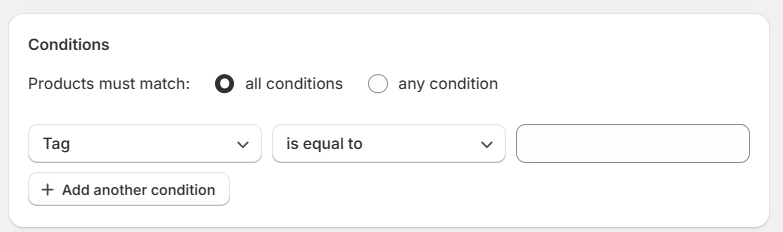
Every condition you add here narrows the collection further. "Match all" means every single one has to hold true, which is exactly where the drift above starts.
2. Tag formatting drifts across staff
Shopify's tag matching does normalize some formatting, treating separators like hyphens, underscores, and plus signs as equivalent. What it won't catch is a plain inconsistency, like one team member tagging new arrivals "New Arrival" and another using "new-arrivals." If your rule is written against one exact tag, products tagged the other way never make it in.
3. The condition ceiling
Shopify caps every collection at 60 total conditions. It sounds generous until you're running an exclusion-based rule, like a sale collection that excludes 40 vendors who don't allow discounting one condition at a time. Hit the ceiling and you can't add another exclusion. The fix is usually flipping the logic, tagging what you want included instead of excluding everything else, but that's a rebuild, not a setting toggle.
The common thread across all three: nothing tells you when it happens. The collection just gets thinner, or emptier, or wrong, and the first person to notice is usually a customer who hit a dead end. This is the specific gap RankCollections is built to close. It monitors your collections against live inventory and pricing, and flags when a rule set starts excluding products it probably shouldn't, rather than leaving you to discover it in a support ticket. It's a detection layer, not a replacement for writing the rules well in the first place.
Can you convert a manual collection to a smart one?
No, not directly. Shopify doesn't have a one-click convert button, and there isn't a way to turn a manual collection into a smart one in place.
What you can do instead is build a new smart collection with conditions that match the products currently in your manual one, verify the product list lines up, and then either keep both live or unpublish the manual version and point its URL at the new one. If the manual collection had a hand-picked sort order, that won't carry over automatically. Smart collections don't support drag-and-drop manual sorting at all, so you'll need to pick from the built-in automated sort options (best selling, alphabetical, price, date) and accept that it's a different kind of order, not a recreation of the old one.
The honest answer is that "converting" is really "rebuilding." It's worth doing when the manual collection has outgrown hand curation, not worth doing for a collection that's working fine as-is.
The SEO angle: sort order, thin collections, and crawl budget
Sort order
Manual collections support true manual sort, drag and drop, full control. Smart collections don't. Once a collection is set to an automated rule, Shopify takes over the ordering and the manual drag option disappears. If product order on a category page is part of your conversion strategy, that's a real constraint to plan around, not a detail to discover after the fact. Our collection page CRO guide covers what to do with sort order once you've picked a lane.
Thin collections
A smart collection with an over-narrow rule set (say, a single tag with only 3 matching products) reads to Google as a low-value page. Thin collection pages are one of the more common reasons category-level pages underperform on impressions, even when the individual products rank fine on their own. If this is a pattern across your store, our category page content guide covers how much on-page content actually helps here.
Crawl budget
Every smart collection that silently empties out or duplicates another collection's products is a page Google is still crawling for no return. On a large catalog, that adds up. If you're running a lot of tag or filter-based automated collections, it's worth reading our guide on structuring categories and filters for SEO alongside this one, since the two problems usually show up together.
Where RankCollections actually fits you
RankCollections is an AI-powered Shopify app that reads your product and inventory data to flag exactly the kind of silent breakage covered above: rule sets that have drifted, collections thinning out from stock changes, and pages that stopped matching what a shopper (or Google) would expect. It's read-only against your store by default, so it flags and suggests rather than changing anything without your approval, and every change stays logged so you can undo it.
It's not a substitute for deciding whether a given collection should be manual or smart in the first place. That decision is still yours to make, using the framework above. What it handles is catching the drift after the decision's been made and the collection's been live for a few months, which is exactly when this stuff tends to go unnoticed.
The free plan covers your first 5 collections, enough to see whether the health checks are actually useful for your catalog before committing to more.
FAQ
What's the difference between a smart collection and an automatic collection in Shopify?
None. Shopify renamed "smart collection" to "automated collection" in the admin, but they're the same feature. Both use rule-based conditions instead of manually added products. You'll see both terms used interchangeably across Shopify's own docs and most guides, including this one.
Can I use both manual and smart collections in the same store?
Yes, and most stores with a real catalog do. It's common to run manual collections for curated or seasonal pages and smart collections for anything inventory-driven or scale-dependent, side by side in the same collection list.
Do smart collections hurt SEO?
Not inherently. The risk isn't the feature, it's an under-specified rule set that produces a thin collection (too few matching products) or an empty one (conditions no longer matching anything). Either of those reads as low-value to Google. A well-scoped rule set doesn't have that problem.
How do I know if a smart collection's rules have stopped matching what I expect?
Shopify won't alert you. The collection just quietly has fewer products, or none. Checking periodically, or using a tool that monitors collections against live inventory, like RankCollections free collection health check, is the only way to catch it before a customer does.
Can I convert a manual collection to a smart collection?
Not directly. Shopify has no one-click convert option. You'd build a new smart collection with matching conditions, confirm the product list lines up, and either keep both live or redirect the old URL to the new one. Full answer with the tradeoffs is above.