Shopify Blog Template: 9 Templates That Actually Convert

Shopify Blog Template: 9 Templates That Actually Convert
The Shopify blog template you pick for a post decides whether it turns into a sale or just sits there getting a few pageviews. Most Shopify stores default to one format (usually a generic how-to) for every post, no matter what the reader actually needs. Below are the 9 templates that convert best for ecommerce blogs, what each one is good for, an example outline for each, and where each one falls short.
What makes a blog template convert (not just look good)
A template converts when its structure matches the reader's decision stage. Someone comparing two products needs a comparison post, not a 2,000-word beginner's guide. Someone who already knows what they want needs a buying guide with a clear pick, not ten paragraphs of history.
The templates that work share three things: they answer the reader's actual question in the first few lines, they show the product solving a real step in the reader's process, and they end with a next action instead of a hard sell.
The 9 templates that actually convert
1. Buying guide
A buying guide walks the reader through the criteria that actually matter before they hand over money, then closes with a specific recommendation. It works because it does the comparison shopping the reader was already about to do themselves, just faster and with more expertise behind it.
The strongest buying guides come from someone who has actually used the products, not summarized spec sheets from other sites. A supplements store writing "How to Choose a Protein Powder" should be naming the exact things a customer support inbox gets asked about: dosage confusion, taste complaints, mixability, not generic bullet points about "quality ingredients."
Table of contents:
- What to Check Before You Buy
- Criterion 1 (e.g. ingredient sourcing)
- Criterion 2 (e.g. price per serving)
- Criterion 3 (e.g. third-party testing)
- Our Top Pick by Budget
- FAQ
Good for: High-intent, pre-purchase keywords like "best X for Y."
Honest weakness: Needs real product knowledge to write well. A buying guide that reads like it was written from a spec sheet loses trust fast, and readers can tell the difference within the first two paragraphs.
2. Comparison (X vs Y)
A comparison post puts two specific products or approaches side by side and tells the reader which one fits their situation. It converts well because the reader has already narrowed their options down to two and just needs the tiebreaker.
The format only works if both sides get a fair shake. If you're comparing your own product to a named competitor, give the competitor's actual strengths, not a strawman version of them. Readers who've done their own research will spot a rigged comparison immediately, and it costs you more trust than not publishing the post at all.
Table of contents:
- Quick Verdict
- Side-by-Side Comparison Table
- Where Product A Wins
- Where Product B Wins
- Who Should Pick Which
Good for: Merchants competing against a known named alternative, or products with a clear tradeoff (price vs features, simplicity vs depth).
Honest weakness: Only works if you're genuinely fair to the other side. A comparison that's obviously rigged toward your product gets called out in the comments and in reviews, and that damage is hard to undo.
3. How-to / tutorial
A how-to walks the reader through completing a specific task, step by step, with enough detail that they can actually do it without opening a second tab. This is the format most stores default to, which is exactly why it's the hardest one to differentiate on.
The way to make a how-to worth publishing is to show the actual steps, not describe them. Real screenshots, the actual settings menu, the actual button names. A how-to that could have been written by someone who never touched the product reads as filler, and both readers and search engines are getting better at spotting that.
Table of contents:
- The Problem in One Line
- Step 1
- Step 2
- Step 3
- Common Mistakes to Avoid
- What to Do Next
Good for: Support-adjacent queries, and any process your product genuinely simplifies compared to doing it manually.
Honest weakness: If a bigger, more authoritative site already owns the exact how-to (official platform docs, for instance), you're unlikely to outrank it on the same angle. Better to cover the SEO or merchandising decision the docs deliberately leave out.
4. Review roundup
A review roundup curates a shortlist of options and gives each one a real verdict, not just a bullet list of features copied from a product page. It works for top-of-funnel research, when the reader knows the category but hasn't picked a direction yet.
What separates a roundup worth reading from a thin one is specificity per item. "Great for beginners" tells the reader nothing. "Cheapest option here, but the battery life is noticeably shorter than the others on this list" tells them something they can act on.
Table of contents:
- Who This List Is For
- Option 1, with verdict
- Option 2, with verdict
- Option 3, with verdict
- Comparison Table
- Our Top Pick and Why
Good for: "Best X" keywords and top-of-funnel research, where the reader is still comparing several options.
Honest weakness: Time-consuming to keep current. A roundup with three discontinued products or outdated pricing damages trust faster than having no roundup at all, so this format needs a maintenance plan, not just a publish date.
5. Best for [audience]
This template takes a broad topic and narrows it to one specific reader segment, which usually means writing a much more useful post than the generic version of the same guide. "Best Running Shoes" is competing with everyone. "Best Running Shoes for Flat Feet" is competing with almost no one and answers a question the generic post can't.
The trick is genuinely tailoring the advice, not just adding the audience qualifier to the title and leaving the body unchanged. If the audience has a real constraint, budget, a physical limitation, a specific use case, the post needs to address that constraint directly in more than one place.
Table of contents:
- [Audience]'s Specific Problem
- Why Generic Advice Doesn't Fit
- Recommendation 1
- Recommendation 2
- When This Audience Should Look Elsewhere
Good for: Long-tail keywords with a built-in audience qualifier, where the generic version of the topic is too competitive to win.
Honest weakness: Narrow audience, narrow traffic. It converts well because intent is high, but it rarely drives volume on its own, so it works best as one piece of a broader content set rather than a flagship post.
6. Alternatives
An alternatives page is built around a competitor's name, "[Competitor] Alternatives," and positions your product as one honest option among several. It captures switcher intent: people who are already using something else and actively looking for a change.
This only works with real transparency. List genuine alternatives, including ones you'd never recommend over your own product, and say why each one might fit a different kind of buyer. A page that's secretly just an ad for your product with two token mentions of competitors reads as exactly that.
Table of contents:
- Why People Look for [Competitor] Alternatives
- Alternative 1, with who it fits
- Alternative 2, with who it fits
- Alternative 3, with who it fits
- What to Weigh Before Switching
Good for: Capturing switcher intent from a competitor's branded search traffic, particularly if that competitor has a known limitation your product addresses.
Honest weakness: Doesn't work at all if you're not willing to name real competitors and describe them fairly. A one-sided alternatives page reads as an ad and rarely ranks well, since Google's own guidance favors genuinely comparative content here.
7. Beginner's guide
A beginner's guide starts from zero and explains a topic to someone who doesn't know the basics yet. It's not trying to sell anything directly. Its job is to earn a reader's trust early, before they're anywhere near a purchase decision.
Because this format targets high-volume, low-competition informational searches, it's often the easiest place for a new store to get its first organic traffic. The post should end with a clear next step, usually an internal link to a more advanced or purchase-oriented post, rather than a hard CTA.
Table of contents:
- What [Topic] Actually Is
- Why It Matters
- The Basics, Part 1
- The Basics, Part 2
- Where to Go Next
Good for: High-volume, low-competition informational keywords early in the funnel, especially for new stores building initial authority.
Honest weakness: Rarely converts directly. Measuring it against a purchase metric will make it look like it's failing when its actual job is earning the internal link click that leads somewhere else.
8. Checklist
A checklist format breaks a process into a scannable, literally checkable list, useful when the reader wants to audit something themselves rather than read an explanation of it. Think "Blog SEO Checklist" or "Pre-Launch Checklist."
Checklists work best when they're genuinely usable, not just a list dressed up with checkmark emoji. Grouping related items (setup, content, technical) and offering a copyable or downloadable version makes the post something a reader bookmarks and returns to, which is good for repeat traffic.
Table of contents:
- The Goal of This Checklist
- Setup Items
- Content Items
- Technical Items
- Downloadable Version
Good for: Readers who want to audit something themselves, like SEO health or store-launch readiness, rather than learn the reasoning behind each step.
Honest weakness: Thin on explanation by design, so it needs to link out to deeper posts for anyone who wants the "why" behind each item, or it risks feeling like a list with no substance behind it.
9. Problem / solution
This template names a specific, frustrating problem the reader is currently experiencing, then walks through the fix. It converts well because the reader arrived already motivated, they typed the problem into Google because it's actively bothering them right now.
The format falls apart with a vague problem statement. "Blogging is hard" isn't a problem, it's a mood. "My Shopify blog posts aren't showing up in Google" is a problem, with a specific, diagnosable cause and fix.
Table of contents:
- The Problem, Stated Plainly
- Why It Happens
- The Fix, Step by Step
- How to Prevent It Going Forward
Good for: Frustration-driven, symptom-based searches, the "why is X happening to me" queries.
Honest weakness: Needs a genuinely specific problem to work. A vague problem statement reads as filler and won't rank against competitors who've written the same post around a precise, searchable symptom.
Skip the manual work: how StoreBlog handles these 9 templates
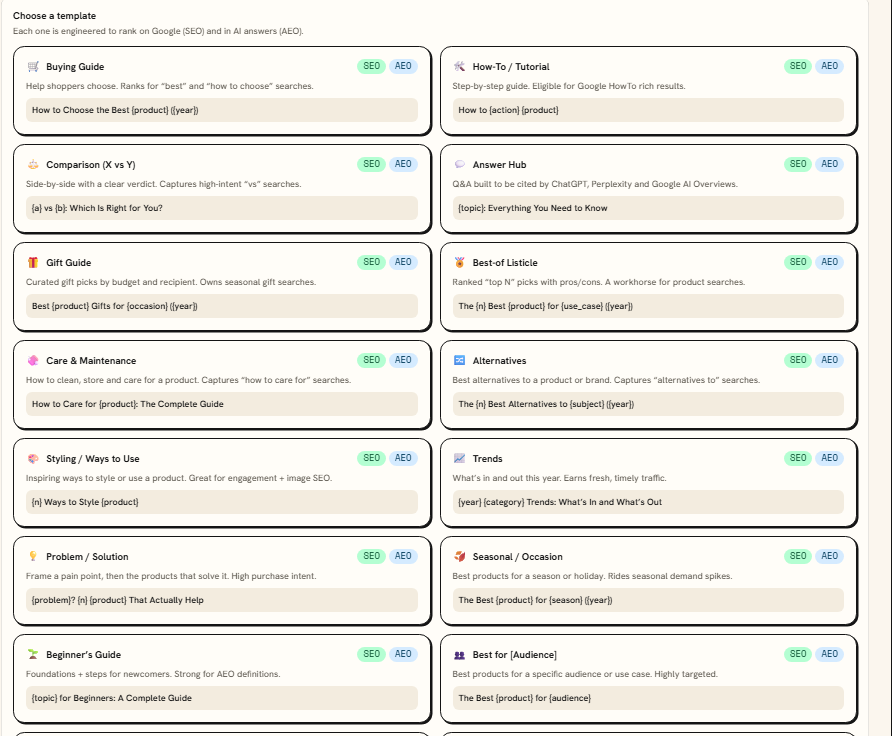
Writing all 9 of these by hand, well, takes real time. That's where StoreBlog helps you. It takes a keyword through research, outlining, drafting, and on-page SEO in one pass, and it currently has 16 built-in SEO and AEO article templates, so several of the formats above (comparison, buying guide, and roundup among them) are already set up rather than built from a blank page. You pick the template that matches the format you're going for, rather than the same boring template every time.
A few features worth knowing about if you're picking a blog tool, not just a template:
- AI Pilot suggests topics ranked by traffic potential, so you're not guessing at what to write next.
- SEO Audit & Auto-Fix scans existing posts and flags issues like missing meta descriptions or oversized title tags, with one-click fixes.
- Revenue Attribution ties specific posts to add-to-carts and orders, which answers the question a lot of merchants actually have about blogging: does this even work.
We've already compared the best Shopify blog apps if you want the fuller picture against other tools in the category.
StoreBlog is free to install with 5 free articles a month, and paid plans start at $19.99/mo.
Install StoreBlog on your Shopify store now.
Customizing a template without breaking blog SEO
Templates give you structure, not a straitjacket. A few rules keep customization from costing you rankings:
- Keep the H1 to one per page, and keep your target keyword in it, even after you've customized the layout.
- Don't skip heading levels. An H3 needs an H2 above it. Skipping levels for visual reasons confuses both readers and search engines.
- Keep your URL slug short and keyword-bearing, no matter how the on-page title changes. See our guide to Shopify blog URL structure for the specifics on what to avoid.
- Don't strip out the direct-answer opening even if it feels repetitive with the H1. That first-60-words answer is what gets pulled into AI answer engines and featured snippets.
- Keep internal links inside the body, placed where they're topically earned, not batched into a "related posts" box at the bottom. A links section at the end gets skipped; a link mid-sentence gets clicked.
For the fuller on-page checklist beyond templates, our guide on creating SEO-friendly blog posts covers meta tags, headings, and image alt text in more depth. If you're customizing the theme template itself rather than just the post content, Shopify's guide to theme templates explains how template files control this structure across your store, not just on blog posts.
Which to pick by store type
- New store, little traffic yet: Start with Beginner's Guide and Problem/Solution posts. They're the easiest to rank on low-competition terms while you build authority.
- Established store with named competitors: Comparison and Alternatives posts. You already have the traffic to make switcher intent worth capturing.
- Product with a lot of buying research: Buying Guide and Review Roundup. These match the reader's actual stage of decision.
- Store selling to a niche audience: Best for [Audience] posts. Narrow, but they convert well because they're speaking to exactly one kind of shopper.
FAQ
What is the best blog template for a Shopify store?
There isn't one best template. It depends on the reader's intent. Buying guides and comparisons convert best for high-intent, pre-purchase searches, while beginner's guides and problem/solution posts work better for earlier-stage, informational searches.
Can I use the same blog template for every post?
You can, but it caps your results. A store running only how-to posts misses the comparison and buying-guide traffic that tends to convert at a higher rate, since those readers are closer to a purchase decision.
Do Shopify blog templates affect SEO?
The content structure does. Clean heading hierarchy, a direct answer early in the post, and a keyword-bearing URL all affect how well a post ranks, regardless of which visual theme template you're using.
How do I add a blog template to Shopify?
From your theme editor, go to Blog posts, then Create template, name it, and apply it from Content > Blog posts > Manage blogs > Theme template. This controls layout and design, separate from the content structure covered in this post.
Is StoreBlog free to use?
Yes. It's free to install with 5 free articles a month. Paid plans start at $19.99/mo and add features like competitor tracking and revenue attribution.
Ready to stop starting every post from a blank page? Try StoreBlog for free and generate your first templated post in minutes.
Share this article